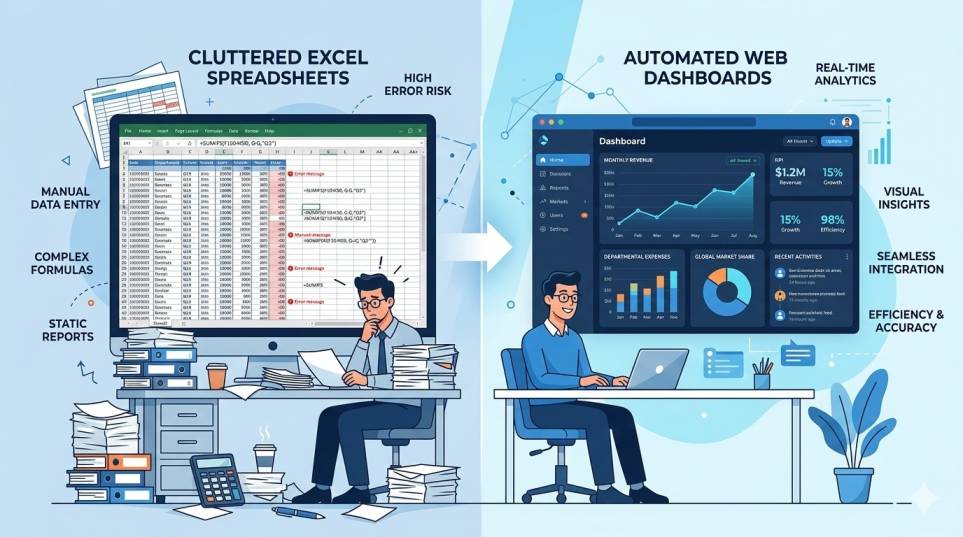
Today, most modern businesses use software to manage operations, customers, finances, and reporting. Earlier, companies had to install software on their office computers and maintain it themselves. But now, many businesses use a much simpler approach called Software as a Service (SaaS).
SaaS has completely changed how companies use software. Instead of installing programs locally, businesses can access powerful tools directly from the internet.
In this article, we will understand how SaaS products work, why businesses prefer them, and see a real example using SmartLab, a laboratory management SaaS platform.
What is SaaS?
SaaS (Software as a Service) is a software delivery model where applications are hosted online and accessed through a web browser.
Instead of purchasing software and installing it on computers, users simply log in to a website and start using the software.
The software runs on cloud servers, and all users access it through the internet.
This makes SaaS much easier to manage compared to traditional software systems.
Traditional Software vs SaaS Software
To understand SaaS better, let’s compare it with traditional software.
Traditional Software
In the traditional model, businesses had to:
- Purchase software licenses
- Install software on office computers
- Maintain servers
- Handle software updates manually
- Fix technical issues locally
This required technical expertise and higher costs.
SaaS Software
In the SaaS model:
- Software runs on cloud servers
- Users access it through a browser
- Updates happen automatically
- Businesses pay a subscription fee
This makes SaaS simpler and more flexible for businesses.
Examples of SaaS Products
Many popular tools used by businesses are SaaS products.
Examples include:
- Google Workspace – email, documents, and collaboration tools
- Salesforce – customer relationship management system
- Shopify – e-commerce platform
- Slack – team communication platform
Users simply create an account and start using the software online.
How SaaS Products Work
Although SaaS products look simple from the user side, there is a structured system working behind the scenes.
Let’s understand the basic workflow.
1. Software is Hosted on Cloud Servers
The application is built and hosted on powerful cloud servers.
These servers store:
- the application code
- user accounts
- business data
- system configurations
The SaaS provider manages and maintains these servers.
2. Users Create Accounts
Businesses create accounts on the SaaS platform.
Each user receives login credentials and access permissions based on their role.
This ensures data security and controlled access.
3. Access Through a Web Browser
Users simply open the website of the SaaS product and log in.
The application loads in the browser and allows users to perform tasks such as:
- entering data
- managing records
- generating reports
- analyzing business performance
No software installation is required.
4. Data is Stored in Databases
When users enter information, the data is stored in secure databases.
These databases help manage large volumes of business data while ensuring reliability and fast access.
5. Automatic Updates and Maintenance
The SaaS provider regularly improves the system.
Updates may include:
- new features
- performance improvements
- security upgrades
Since the software runs on servers, updates are applied centrally and users automatically get the latest version.
Benefits of SaaS for Businesses
Businesses prefer SaaS solutions because they offer several advantages.
Easy Access
Users can access the software from anywhere using the internet.
This allows teams to work remotely and access important information anytime.
Lower Initial Cost
Businesses do not need to purchase expensive software licenses or servers.
Most SaaS platforms use affordable subscription plans.
Automatic Updates
Users always get the latest version without manual updates.
Scalability
Businesses can easily add more users or upgrade plans as they grow.
Reduced Maintenance
The SaaS provider manages servers, security, and system updates.
This reduces the burden on businesses.
SaaS Pricing Model
SaaS products typically use a subscription-based pricing model.
Common pricing options include:
Monthly Subscription
Users pay a fixed amount every month.
Yearly Subscription
Businesses pay once per year, usually at a discounted rate.
Plan-Based Pricing
Different plans provide different features, such as:
- Basic Plan
- Professional Plan
- Enterprise Plan
Businesses can upgrade as their needs grow.
Example SaaS Platform: SmartLab
A practical example of SaaS software is SmartLab, a Smart Laboratory Management System designed for diagnostic laboratories.
SmartLab helps laboratories manage patients, tests, reports, and billing in a single cloud-based system.
Instead of maintaining multiple spreadsheets or manual records, labs can operate through a centralized digital platform.
SmartLab Key Features
Below are some important capabilities of SmartLab.
Patient Management
- Register patients quickly
- Update patient details
- Search patients using report ID, name, phone, email, or address
Flexible Test Assignment
- Add or remove lab tests easily
- Assign tests to patients during registration
- Manage test lists efficiently
Multi-Test Management
- Assign multiple tests for a single patient visit
- Track test progress in real time
Report Status Tracking
- Identify pending reports
- Track completed reports
- Monitor delayed reports
Billing Management
- Generate bills for lab tests
- Manage payment modes
- Apply discounts easily
Live Dashboard
- Monitor patient traffic
- Track laboratory performance
- View revenue insights
MIS and Operational Reports
- Access consolidated MIS reports
- Analyze patient and test data
- Track operational performance
Configuration and Access Control
- Manage test pricing
- Configure test parameters
- Control user access and permissions
Additional Automation Features
SmartLab also provides:
- quick patient lookup using mobile number
- automatic subscription renewal
- email notifications for payments and offers
- support for numeric, textual, and mixed test reports
Why SaaS Platforms Like SmartLab Matter
Industries such as healthcare generate large volumes of data daily.
Managing this data manually can lead to errors and inefficiencies.
SaaS platforms like SmartLab help organizations:
- digitize operations
- automate workflows
- reduce manual errors
- improve reporting and decision making
By using cloud-based software, laboratories can focus more on patient care and operational efficiency.
The Future of SaaS
SaaS software is becoming the foundation of modern business systems.
Companies across industries are adopting SaaS platforms for:
- customer management
- accounting systems
- HR operations
- MIS reporting
- operational dashboards
As digital transformation continues, SaaS solutions will play an even bigger role in helping businesses operate efficiently.
Final Thoughts
SaaS products have simplified how businesses use software. Instead of installing and maintaining complex systems, companies can now access powerful applications directly through the internet.
This model provides flexibility, lower costs, automatic updates, and better scalability.
Platforms like SmartLab demonstrate how SaaS solutions can streamline operations in specialized industries like diagnostic laboratories.
By combining patient management, test tracking, billing, and MIS reporting into one platform, SmartLab helps laboratories improve efficiency and manage their operations more effectively.
FAQs – How SaaS Products Work?
How do SaaS applications work?
Users log in via the internet, and data is stored on cloud servers.
What are examples of SaaS products?
SmartLab, Google Docs, Zoom, and CRM systems.
Is SaaS better than traditional software?
Yes, it is easier to use, scalable, and requires no installation.
How do SaaS platforms charge users?
Mostly through monthly or yearly subscription plans.